
If you are wondering how to use Mod Podge photo transfer medium, here are all of my top tips. Learn how to be successful with this article! Scroll down to see a video of the process in action!
Have you ever used Mod Podge photo transfer medium? It’s a great formula – one of my Mod Podge-y favorites (I use it to transfer photos to wood!).
It’s also one of the formulas that I get the most questions about, so I thought I’d share some tips about using this medium to do a photo transfer with you.
Mod Podge in general is really easy to use, however, the photo transfer medium takes a bit of practice. This isn’t meant to be discouraging – it’s actually meant to be the opposite!
It’s not nearly as hard as knitting, another one of my favorite crafts. I learned to knit at age 15 and messed up like you wouldn’t believe. Yet I kept at it, and now I love it.
And that’s the way I feel about Mod Podge photo transfer medium.
Mod Podge Photo Transfer Tips
So here’s the point: you’re going to master it, I promise! With a little practice and patience, you’ll be a photo transfer ninja. Here are some of my most important tips to use Mod Podge photo transfer medium.
1) Remember that the medium isn’t clear.
When people ask me “why should I use Mod Podge photo transfer instead of regular Mod Podge?” Well . . . this is one big reason.
This isn’t just Mod Podge in a different bottle.
It’s a product meant for photo transfer only, and it will produce an opaque, white background. This means you can use it on dark colored items too. Plan your project accordingly.
2) Print your image on a dry toner printer; don’t use real photographs.
Both inkjet and laserjet will work, it just has to be a dry toner printer. So how to tell if your printer is dry toner? It’s hard to say. Laserjet will work 99% of the time. Inkjet . . . it just depends.
My HP works very well because it has a very dry ink. There are about 10,000 different printers out there, so I’d say your best bet is to do a small test if you’re unsure. This will help you practice too! Grab a small scrap of paper and print out a small image – let’s say 2″ or 3″ square.
Expert tip: if you are printing an image with words – reverse the image on your computer before printing! The words will come out correctly when you do the transfer.
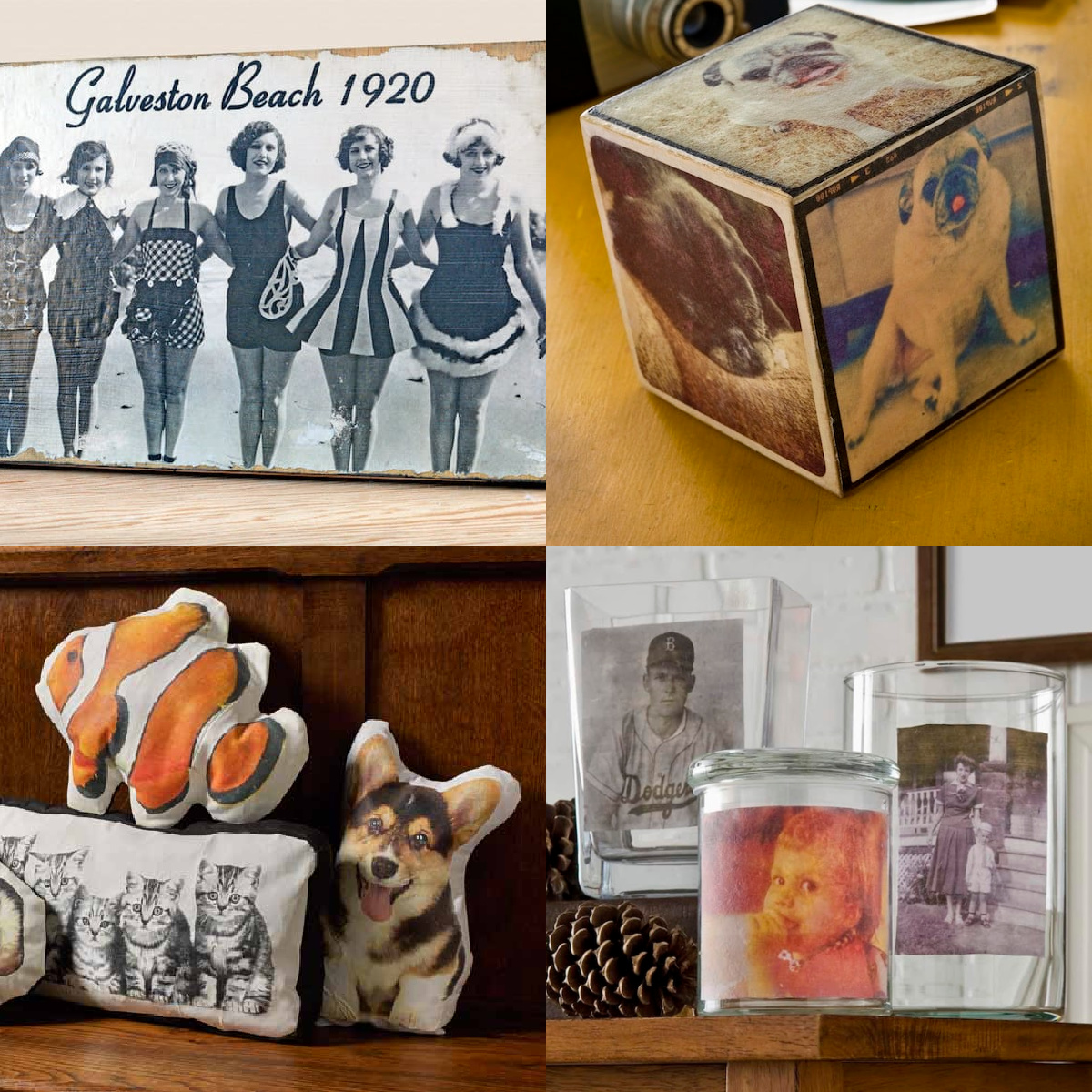
3) Make sure to use enough medium on top of the image.
So here’s my process. I cut the image down to size, and then place it face up on my Mod Podge silicone mat. I use a foam brush to apply the transfer medium over the top of the photo until the image is obscured completely – meaning, I can’t see any of the photo.
Then I use a fingernail or tweezers to pick up the corner of the image, flip it over, and place it down onto the surface. I use my Mod Podge brayer to roll out the image.
If you used the right amount of medium, not much (if anything) will come out the sides. If it does, wipe away, as it will dry and be stuck there if you don’t!
Leave your photo transfer to dry for 24 hours.
4) Take a lot of patience and care when rubbing off the paper.
This is probably the hardest part of the whole thing. You will need to wet your item and rub the paper off, revealing the image below. It’s a little weird to wet your craft project and you’re going to be thinking, “am I doing this right?”
Start lightly and rub off the paper backing – let dry to see what you’ve done. If your image doesn’t look right, wet again and repeat. As you get more experience, you’ll start to see exactly how much you can rub to reveal the image without ruining it.
Because if you rub too hard, you will rub the image away . . . and we don’t want that! I rub with medium pressure, then I typically let dry and rub again if necessary. These days I’m good enough to get it on the first try! You can get there, too.
5) Expect a vintage-style image.
This (to me) is an advantage over just Mod Podging an image down. Well, this and the item is now washable (if it’s fabric). But I do love the vintage-y look that a photo transfer gives you.
It’s a less sharp version of a real photograph, and it has its own unique look that I appreciate. Once you do try it, you’ll see exactly what I mean. The soft, vintage-y look is really nice in home decor. I think you’re going to like it!
NOTE: This medium is hand washable only. Keep that in mind! No machine washing, my friends.
Now that you know my tips, I’d also love to know what questions you have about Mod Podge photo transfer medium in the comments! And if you’re ready to watch the video of the process, all you have to do is click play below:
Are you ready to try it?? Visit our Mod Podge photo transfer craft ideas! I’d also love for you to visit the following projects:




I do woodburning and started to do photo transfers awhile ago and they have turned out wonderful. I’m currently working on a woodburning and photo transfer project that I was asked to make for a friend’s wedding. I don’t know what the problem is this time but on some pictures when I get to the wetting and rubbing off step, it seems like small little sections won’t damped at all or when I keep getting small little sections of white that seems like it’s the dried midge lodge maybe? Any advice? And second question is, I usually seal my photos and boards with the midge lodge acrylic sealer in the spray can, and I did it this time forgetting that I needed to write the names of the people on the photos , what, if anything would be a good ink to use on top of the sealer?
Yes, those small sections of white are the dried photo transfer medium and the only way to avoid those is avoid letting it dry in that spot. And you can use Sharpie on top of the sealer! Keep in mind the more you write it might ruin the pen if it’s a soft tip. You could try an oil based Sharpie paint pen as well.
I followed all the directions and video to transfer my pix onto a pillow case (thick, burlappy, but not burlap fabric). When putting the water on & rubbing off the paper, it looked great, but after it dried, you couldn’t really see the pix. They were VERY cloudy. What did I do wrong???
Hi Darragh! A lot of times that’s because there is still more paper on there. Try wetting and rubbing again. Don’t go crazy because you don’t want to rub the pic off. Just rub lightly, let dry, repeat.
I’m doing photo coasters (old idea, I know) so I want the surface a little rough. I achieve this on my napkin decoupage by applying several coats of Matte Mod Podge with a ‘pounder brush’, then varnish. Will this do anything funky to the photo transfer medium? I don’t have extra tiles to experiment with. Thanks ahead of time
Hi Sharon! If you want to have the texture, I’d just put photos directly on the coasters like this: https://modpodgerocksblog.com/personalized-mod-podge-coasters/
Photo transfer medium doesn’t really have texture and you won’t be able to spounce it on . . . and with smooth tiles, it won’t transfer well anyway. The tiles need to be smooth/porous.
I leave the paper on the wood for 24 hours to dry? Correct. I think I messed up on this section cause I rub it smooth then took the paper off
Yes you do leave the paper for 24 hours. THEN you remove the paper and leave the photo transfer behind!
Are there any other hints for doing it on seashells
Hi Amy! I went to Mount Rainier for the first time recently and last night at 10:52 I used modge podge photo transfer on wood for the first time!!! So now I’m waiting to use water to take the paper off. My question is when I take the paper off can I use my Matte modge to seal the image on the wood? Thank you!
Grace
Hi Grace! Yes you can. Also I love Rainier; I have a forestry degree and lived in Seattle for many years so I’ve spent a lot of time there. Glad you got to visit!
@Amy, yes I loved it at mount Rainier and the modge podge transfer worked!! I was hoping to show you but I don’t know how to send an attachment. Tomorrow I’ll put some Matte modge podge over the image.
Hi Amy, there was a product I used to remove the paper from a printed page to transfer to a canvas years ago which is not around any more. What I did was the same removal process, but I stuck it to the canvas on the paper side instead of the transfer gel side which worked really well and made the image sharper. Do you think I can do it the same way with Modge Podge? Bob
Hi Bob! I’m not sure at all – I’d like to learn more about this product. Do you remember the name of it?
Can I use it on cardboard?
You can! It works on porous surfaces well.
I’m trying to do puzzles for families in my program. So why not actual photos? Ive seen many photos used on wood.
Hi Pakuda – Mod Podge transfer medium doesn’t work with real photos (this post is about photo transfer medium), only dry printed images. You can try using photos with regular Mod Podge on wood. It’s much easier to use printouts, but you can try real photos if you are so inclined!
what type of paper is best to print the image on to use this product?
“Regular” printer paper works – like around 20 lb. A little less is fine. You just don’t want it too thick to wipe away.